 Lingofloat
MeetLingofloat—allyouneedtomasterEnglish
Forget juggling podcasts, YouTube, dictionaries and Anki decks. Lingofloat allows you to enjoy your favorite English content and remember new language with ease
Transcribe your input sources
Click a podcast, drop a link. Lingofloat generate high-quality transcripts and word-level timestamps for any audio source.
Listen, replay and comprehend on the fly
Listen to authentic content using interactive transcripts that allow you to jump, replay, and look up words with intuitive, detailed explanations.
Review language in different real context
Save challenging words or phrases and master them through well-designed activities with smart SRS (Spaced Repetition System).
Features
Transcribe anything with accuracy
Lingofloat lets you transcribe YouTube videos, podcast episodes, and your own audio and video files directly in the app, with industry-leading accuracy, and review them in the same workspace.
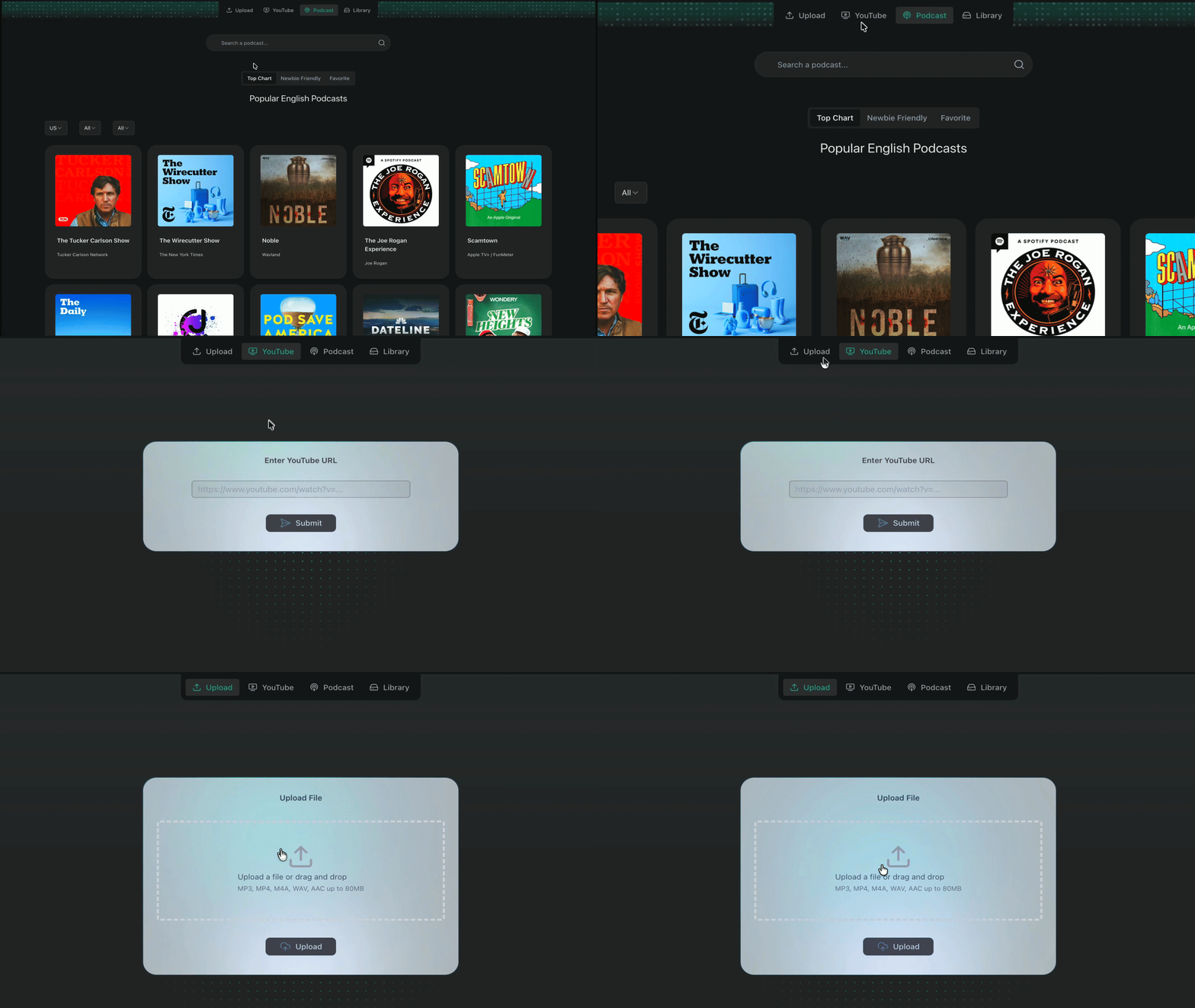
YouTube
Import directly via URL
Podcasts
Pick an episode directly in the App
Recordings
Upload your recordings
Files
Upload mp3, wav, m4a
A media player
English learners dream about
Traditional media players are built for entertainment. Ours is built for learning, comprehension, and uninterrupted flow.
Full control over your content
Smarter dictionary, not harder
All-Level Comprehension
Word-level Timestamp
Jump to any specific word instantly.
Smart Selection
Select and replay any chunk of the audio.
Keyboard Shortcuts
Control playback without lifting your fingers.
Auto-Pause
Automatically pauses at natural breaks.
Variable Speed
Adjust playback speed to your comfort level.
Review a vocabulary
in different real conversations
No more manual Anki work or imports. Lingofloat creates well-designed review sessions that let you not just remember an expression, but actually use it in real life.
Listen first — no text
Start with a short, natural conversation including your target words. No transcript—just pure audio to train your ear.
Quick comprehension check
Pronunciation practice
Echo & shadow with feedback
Active rephrasing
Video Demo
Smart Tracking
Our algorithm learns what you know and decides when you need to see it again.
Visible Progress
Watch your fluency grow with detailed stats on listening and speaking accuracy.
Spaced Repetition
Never forget a word. We schedule reviews at the perfect moment for memory retention.
Start your journey
Free - Open Beta Now!
- Unlimited import for podcast shows, YouTube videos, and media files with high-precision transcription
- Access to high-performance player with segmented playback and word-level timestamps
- Instant definition lookups and paragraph-level breakdowns
- Real-life conversation context review with a smart spaced repetition system
Trusted by serious learners
"I was stuck replaying podcast or YouTube segments and taking notes manually. Now I can replay anywhere I want, save it, and review inside the same app."
"If you're trying to go from passive listening to actually getting good at this, Lingofloat is the only tool I point people to. Its review system really sticks the new words in your memory."
"I upload team meetings, capture everything I miss, and drill it the same evening. It replaced three apps and gave me confidence on settling down in Canada."
Frequently Asked Questions
Most English apps keep you at a low level: short, simple, almost childish sentences that don’t sound like how people actually talk. That’s fine for beginners — but it doesn’t prepare you for real podcasts, YouTube videos, or conversations. To really master English, you need to work with authentic input: real voices, real speed, real grammar, real messiness. The problem is, when you finally face real English, it suddenly feels too fast, too dense, and full of unknown phrases. That’s exactly where Lingofloat comes in:n Built for real English, not textbook English – You bring your own podcast episode, YouTube video, or recording. Lingofloat helps you handle the real speed, accent, and complexity step by step. Solves the “I don’t get this” moments – Hard vocabulary, weird expressions, confusing grammar, fast chunks — Lingofloat is designed to break them down, explain them in context, and let you replay exactly what you need. Makes the tough parts stick – Every word, phrase, or pattern you struggle with can be saved. Our built-in review system turns those “difficult bits” into smart practice sessions so you don’t just understand once — you actually remember and can use them later. Lingofloat doesn’t keep you in “app English.” It connects your study directly to the real English you actually want to understand.
Both Shadowing and the Echo Method are powerful techniques for improving your language skills, but they work differently. Shadowing requires you to listen to a native speaker and speak along with them simultaneously. The Echo Method, however, involves listening to the speaker and repeating what they say after a short delay. While Shadowing is more famous in the language learning realm, we recommend the Echo Method for Lingofloat users. The key to its success is the "mental replay"—pausing to hear the sound in your mind before you speak—which has been proven to improve all aspects of language acquisition. For advanced learners, combine both for the best results: • Step 1 - (Echo): Listen to a sentence, pause, and repeat it to ensure you understand the words and accurate pronunciation. • Step 2 - (Shadow): Once comfortable with the text, play the audio continuously and shadow it to lock in speed and intonation. For more information, we recommend checking out this video where Professor Karen Chung, who invented this method, explains how she used this technique to achieve native-like Mandarin.
Real-world English can definitely feel intimidating at first, especially if you’re used to simple textbook examples or app-style sentences. But starting to work with real input (with the right support) is one of the fastest ways to train your ear, build real fluency, and get used to how people actually speak. And if something feels too hard, you don’t have to jump into the most difficult content. There is plenty of authentic material that’s beginner-friendly while still being high-quality and interesting. Lingofloat is built to help you handle this kind of real English step by step: you can pause, jump back, replay small chunks, see the transcript, and look up words or expressions in plain, learner-friendly English. On top of that, we offer a curated list of recommended content for you to browse, so you can start with easier, clearer material and gradually move to more challenging episodes as you grow more confident.
When you save a word or expression, Lingofloat creates a review plan that adjusts its schedule based on your performance. The content you review consists of a series of activities designed to help you do more than just remember the translation—you'll become truly familiar with every aspect of the vocabulary. Crucially, the conversation and content of each review session are unique, ensuring you master the word's usage rather than rote-memorizing the answers.
Yes—just drop in any voice notes or meeting/lecture recordings. Lingofloat will transcribe them, let you replay any part, and look up language in context.
Lingofloat mainly focuses on listening and comprehension, but that directly supports speaking. By using Lingofloat you will: • Hear how words and expressions are used in real sentences • Notice patterns and phrases native speakers repeat • Review language in context so it becomes easier to reuse when you speak You can also replay thought groups (small chunks of speech), shadow them, and practice saying them out loud. That combination of listening + repetition builds a much more natural speaking style over time.
You might notice there’s no bilingual transcript and that our dictionary explains things in English, not in your native language. That’s deliberate. Technically, adding full translations is easy. But Lingofloat is designed to help you think in English, not constantly switch between two languages. Staying in English as much as possible helps you: • Build fluency faster (less translating in your head) • Develop a stronger feeling for how words and expressions are really used • Notice patterns, collocations, and grammar more naturally To make this comfortable, our dictionary explanations are written in plain, learner-friendly English — short sentences, simple wording, and clear examples, not academic dictionary jargon. That said, we know a tiny bit of translation can still be useful. So we include a very short translation hint in the dictionary as an extra clue — just enough to help, without turning your study into pure translation practice.
Lingofloat is a web app, but it’s designed to feel smooth and natural on any device, including your phone. For a native app–like experience on your phone, you can add it to your home screen: • Open Lingofloat in your browser (Safari, Chrome, etc.)n • Open your browser’s menun • On iPhone (Safari): tap Share → Add to Home Screenn • On Android (Chrome): tap the ⋮ menu → Add to Home screen A Lingofloat icon will appear on your home screen and open full-screen, just like any other app No app store downloads, no manual updates — you always get the latest version automatically.
We’re launching with English-first. Additional languages are on the roadmap—Pro members vote on which language we ship next.